
You put in the workouts. You eat reasonably well. You sleep what feels like enough. Yet weeks pass and you still can’t tell if any of it is actually working. That frustration is more common than you’d think, and the fix isn’t more effort. It’s better data. Journaling your wellness information inside a fitness app gives you a structured record that reveals patterns, exposes gaps, and turns guesswork into informed decisions. This guide walks you through exactly how to set it up, use it consistently, and protect your information along the way.
Table of Contents
- What you need to get started
- Step-by-step: Journaling your wellness data
- Avoiding common mistakes and psychological pitfalls
- Measuring progress and adjusting your routine
- Why your wellness data is more than numbers
- Ready to optimize your wellness journey?
- Frequently asked questions
Key Takeaways
| Point | Details |
|---|---|
| Choose reliable tools | Start with a trustworthy fitness app and devices that prioritize your privacy. |
| Track consciously | Journaling your wellness data can reveal valuable patterns and guide smarter choices. |
| Stay flexible with goals | Avoid rigid targets and adjust your approach to stay motivated and healthy. |
| Protect your privacy | Always use apps offering strong data protection and transparency. |
What you need to get started
Now that you see the value in tracking wellness data, let’s cover what you actually need to begin.
Core hardware and software
The barrier to entry is lower than most people expect. Here’s the minimum setup:
- Smartphone (iOS or Android, updated to a current OS version)
- Fitness app of your choice, installed and configured with your basic profile
- Compatible wearable device (optional but recommended for automated data capture)
- Stable internet connection for syncing and cloud backup
A wearable device is not mandatory. Many users start with manual entry only and add a tracker later once they understand what data matters most to them. The key is choosing one primary app and sticking with it long enough to build a usable dataset.
Evaluating data privacy before you connect anything
This step gets skipped far too often. Before you connect a wearable or grant a third-party app access to your health records, check the privacy policy. Wearable privacy policies vary widely, with Apple and Google ranking as low-risk while brands like Xiaomi and Huawei score high-risk in transparency, data minimization, and third-party sharing. That gap is significant when your resting heart rate, sleep cycles, and menstrual data are involved.
Look for these specific features in any app you consider:
- On-device encryption for stored health data
- Granular permission controls so you decide what each app can access
- Clear data deletion policy if you cancel or uninstall
- No sale of personal health data to advertisers or data brokers
Consult your healthcare provider first
If you plan to track advanced metrics like blood oxygen, heart rate variability, or blood glucose, talk to your doctor before acting on that data. Fitness apps are not medical devices. They provide useful reference points, not clinical diagnoses. A provider can help you set realistic targets and interpret unusual readings without unnecessary alarm.
Pro Tip: Before connecting any app to a wearable or health platform, open the app’s security settings and confirm that encryption is enabled. Many apps offer this feature but do not activate it by default.
| Feature | What to look for | Why it matters |
|---|---|---|
| Encryption | AES-256 or equivalent | Protects stored data from breaches |
| Permission controls | Per-app, per-metric access | Limits unnecessary data exposure |
| Third-party sharing | Opt-in only | Prevents data sale without consent |
| Data deletion | Full account and data removal | Gives you control when you stop using the app |
Digital health platforms that integrate fitness tracker data with personalized interventions show sustained improvements in blood biomarkers like LDL-c across more than 20,000 users. The technology works. The prerequisite is choosing the right tools and protecting your information from the start.
Step-by-step: Journaling your wellness data
With your tools and privacy protections ready, it’s time to put your plan into action. Here’s how to start journaling your wellness data effectively.
Step 1: Initial app setup and device integration
- Create your profile with accurate baseline data: age, weight, height, and fitness goals.
- Connect your wearable using the app’s official integration process. Avoid third-party bridge apps that add unnecessary data-sharing layers.
- Set your notification preferences to prompt daily logging without becoming intrusive.
- Review permissions one final time after connecting devices to confirm only necessary data is shared.
Step 2: Build a consistent journaling routine
Consistency matters more than completeness. Logging five data points every day outperforms logging twenty data points three times a week. Pick a fixed time, such as right after your morning routine or just before bed, and make it a non-negotiable part of your day.
What to log and how often:
- Workouts: Type, duration, intensity level, perceived effort (daily or after each session)
- Sleep: Total hours, quality rating, wake events (every morning)
- Mood and energy: Simple 1 to 5 scale (morning and evening)
- Hydration: Fluid intake in ounces or milliliters (throughout the day)
- Nutrition: Calorie range, macronutrient balance, notable foods (daily)
Step 3: Automate where possible, but verify the data
Automated sync from a wearable saves time and improves accuracy for metrics like steps, heart rate, and sleep stages. However, automated data is not always correct. Review synced entries at least once a week to catch errors, such as a sleep tracker recording a movie session as deep sleep.

Apple Health encrypts health data and requires explicit user permission for third-party app access, using a Protected Unless Open data protection class. This means your data stays locked even if your phone is in an unauthorized person’s hands.
Pro Tip: Enable encryption in your app’s settings immediately after setup. Then navigate to the permissions section and audit which apps have access to which data categories. Remove anything that does not need access.
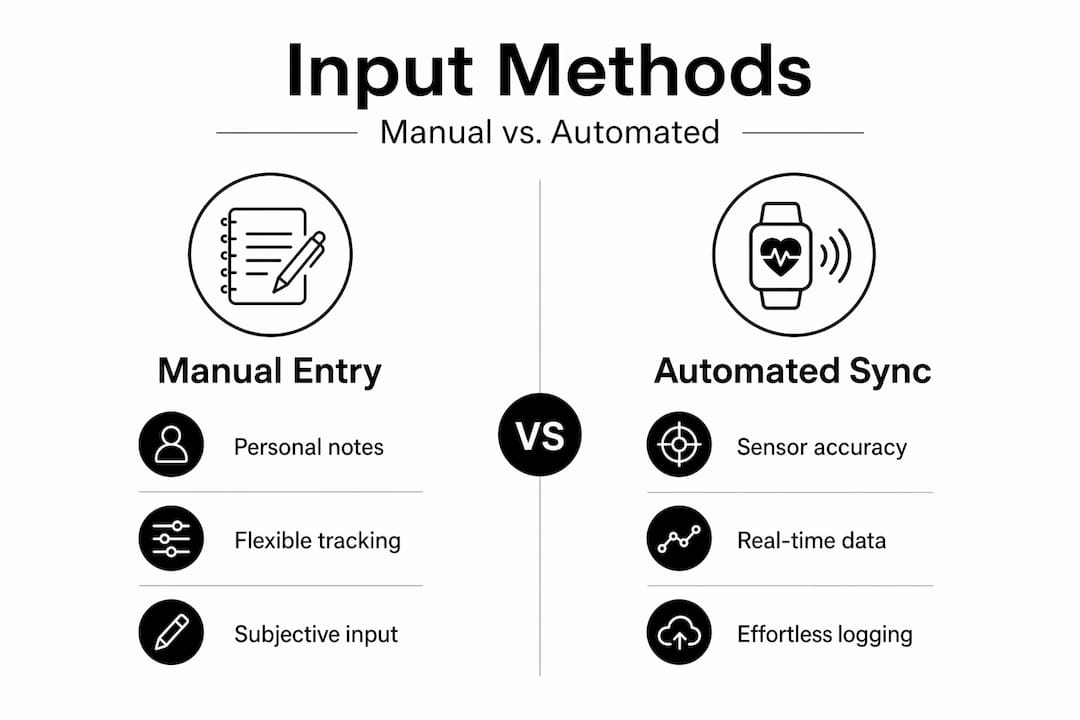
Manual entry vs. automated sync: A practical comparison
| Factor | Manual entry | Automated sync |
|---|---|---|
| Accuracy | Depends on user honesty | Depends on sensor quality |
| Time required | 5 to 10 minutes daily | Near zero after setup |
| Data completeness | Only what you remember | Continuous, passive capture |
| Privacy risk | Lower (no device connection) | Higher (device and app data sharing) |
| Best for | Mood, nutrition, subjective notes | Steps, heart rate, sleep stages |
| Flexibility | High (log anything) | Limited to sensor capabilities |
The most effective approach combines both methods. Use automated sync for objective biometrics and manual entry for subjective data like mood, stress, and perceived workout difficulty.
Avoiding common mistakes and psychological pitfalls
As you begin tracking, it’s easy to fall into traps that turn data into discouragement. Here’s how to avoid the most common mistakes.
The most frequent missteps
- Obsessing over daily fluctuations instead of weekly or monthly trends. Weight, for example, can vary by two to four pounds in a single day due to water retention, digestion, and hormonal shifts.
- Setting rigid, all-or-nothing goals that leave no room for rest days, illness, or life disruptions.
- Ignoring signs of physical fatigue because the app says you haven’t hit your step count yet.
- Logging only the good days, which skews your data and hides the patterns that most need attention.
- Comparing your data to others rather than to your own baseline.
Fitness app self-monitoring can lead to negative psychological effects including shame, demotivation, and disengagement, particularly when inaccurate algorithms produce rigid, unachievable goals. This is a real and documented risk, not a minor inconvenience.
“The problem isn’t the data itself. It’s treating every number as a verdict rather than a data point in a longer story. Rigid tracking systems that penalize rest or flag normal variation as failure actively undermine the motivation they’re supposed to build.”
Flexible goal setting and periodic reassessment
Set goals in ranges, not fixed points. Instead of “walk exactly 10,000 steps every day,” try “average 8,000 to 10,000 steps across the week.” This approach accommodates real life without abandoning the target entirely.
Schedule a brief goal review every four weeks. Ask yourself: Is this goal still relevant? Is it too easy or too hard? Has my lifestyle changed in a way that requires adjustment? Reassessment is not failure. It’s accurate calibration.
Responding to unexpected results
When your data shows something surprising, such as consistently poor sleep despite good habits, treat it as a question rather than a problem. Bring that data to your healthcare provider. Cross-reference it with other logged variables like caffeine intake, screen time, or workout timing. The value of a journal is that it gives you context, not just numbers.
Measuring progress and adjusting your routine
After you’ve built consistent habits, your recorded data becomes a powerful tool for change. Here’s how to turn numbers into tangible progress.
How to audit your data effectively
- Weekly review: Spend 10 minutes every Sunday scanning the past seven days. Look for patterns in energy levels, sleep quality, and workout performance.
- Identify trends: Flag any metric that has moved consistently in one direction for two or more weeks. Both positive and negative trends deserve attention.
- Set new priorities: Based on what you find, adjust your focus for the coming week. If sleep quality is dropping, prioritize recovery over adding workout volume.
- Document your observations: Add a brief written note to your journal entry summarizing what you noticed and what you plan to change.
Key stat: Over 20,000 users on integrated digital health platforms showed sustained improvements in blood biomarkers like LDL-c through guided tracking combined with personalized interventions. That scale of evidence is meaningful.
Tips for adapting your routine based on data
- Collaborate with healthcare professionals when data reveals persistent anomalies. A trainer can adjust your program; a doctor can rule out medical causes.
- Adjust based on energy and mood trends, not just performance metrics. A week of low mood scores paired with high training volume is a signal to reduce intensity.
- Track recovery as seriously as training. Log rest days, stretching sessions, and sleep quality with the same discipline you apply to workouts.
Accounting for genetic and lifestyle factors
Not everyone responds to the same training or nutrition approach in the same way. Edge cases include genetic predispositions that make certain biomarker improvements harder to achieve, and contrasting user experiences highlight that demotivation risks are real even when the data looks good on paper.
If you’ve tracked consistently for 90 days and a specific metric isn’t moving, consider genetic testing services, consult a registered dietitian, or work with a sports medicine specialist. Your journal data becomes the most useful document you can bring to those conversations.
Why your wellness data is more than numbers
While the mechanics of tracking are important, there’s a deeper perspective you shouldn’t miss.
Most fitness tracking content focuses on what to measure and how often. That’s useful. But it misses something more important: your wellness journal should tell a coherent story about your life, not just produce a spreadsheet of biometrics.
Think about what a single day’s data actually captures. Your step count reflects whether you walked to a meeting or sat through back-to-back video calls. Your sleep score reflects whether you were anxious about a deadline or genuinely at rest. Your calorie log reflects a social dinner with friends or a stressed, late-night snack. Numbers without context are noise. Numbers with context are insight.
This is where most users go wrong. They optimize for the metric instead of the behavior behind it. They chase a perfect sleep score by going to bed earlier, but they don’t examine why their stress levels are consistently high at 9 PM. The journal is the tool. The goal is understanding.
Privacy is equally non-negotiable. Established platforms like Apple prioritize on-device encryption and granular permissions, but commercial apps must address data sharing risks to build genuine user trust. Your health data is among the most sensitive information you generate. Treat it accordingly. Choose platforms with demonstrated privacy commitments, not just good marketing copy.
Finally, less is often more. Tracking 30 metrics simultaneously creates cognitive overload and reduces the quality of attention you give to each one. Pick five to seven metrics that directly relate to your current goals. Track those well. Add more only when the first set becomes routine and genuinely useful.
Fitness isn’t just what you measure. It’s how you feel, adapt, and protect your journey.
Ready to optimize your wellness journey?
You now have a clear, practical framework for journaling wellness data, protecting your privacy, and turning tracked information into real improvements. The next step is equipping yourself with the right tools.

At techfrommari, you’ll find a curated selection of fitness trackers, health monitoring devices, and wearable technology designed to integrate seamlessly with the journaling approach outlined in this guide. Whether you’re starting with a basic activity tracker or ready to upgrade to a full health monitoring system, the product range covers the full spectrum of wellness tech needs. Explore the options, compare specifications, and find the device that fits your data goals and lifestyle.
Frequently asked questions
What’s the best way to protect my fitness app data?
Use reputable apps that offer strong encryption, require explicit permission for third-party access, and let you control data sharing. Apple Health encrypts health data and uses a Protected Unless Open data protection class as a strong baseline example.
Can fitness apps really improve my health?
Yes, studies show integrated use of wellness data in fitness apps can lead to measurable improvements in health markers for many users. Blood biomarker improvements including LDL-c were documented across more than 20,000 users on integrated digital health platforms.
What should I do if tracking my data makes me feel anxious or discouraged?
Reassess your goals, consider a more flexible approach, and remember that well-being is about trends, not perfection. Self-monitoring risks including shame and demotivation are documented, so adjusting your tracking intensity is a valid and healthy response.
Are all fitness apps equally safe for privacy?
No, privacy standards vary significantly across platforms. Privacy risk levels differ considerably, with Apple and Google ranking low-risk while some other major wearable brands score high-risk in transparency and third-party data sharing.